
Brand Expand allows you to easily move or share products between different Workspaces within the same account, giving you full control over which workspaces can access and manage each product.
How to Move a Product Between Workspaces
- Navigate to the Product Detail Page of the product you want to move.
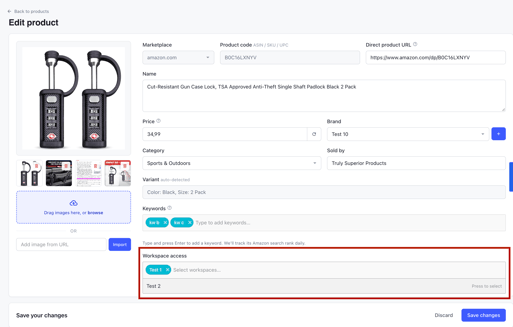
- Click Edit to access the product settings.
- Locate the Workspace Access section.
- Select the workspace(s) you want to grant access to the product.
- Add or remove workspaces as needed.
- Click Save changes to apply your changes.
Important Notes
- Multiple Workspace Access: A product can be assigned to one or multiple workspaces simultaneously.
- Moving Products: To move a product from one workspace to another, simply add the new workspace and remove the previous one.
- Shared Products: If you want a product to be accessible from multiple workspaces, select all the relevant workspaces under Workspace Access.
- Same Account Only: Products can only be moved or shared between workspaces belonging to the same Brand Expand account.