
The Product Detail Page provides a centralized view of all the information, performance metrics, and settings related to a specific product in Brand Expand.
By scrolling down, you'll find several tabs that allow you to manage and monitor different aspects of your product.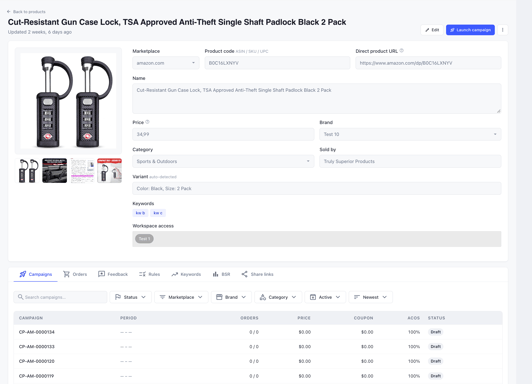
Available Tabs
- Campaigns: View and manage all campaigns associated with the selected product.
- Orders: Access the complete list of orders generated across all campaigns related to the product (across all campaigns).
- Feedback: Review Product Listing and Post-Delivery Feedback collected from buyers across all campaigns, including AI-powered summaries highlighting key insights.
- Rules: Configure your Repeat Buyer Frequency (RBF) settings at the Product, Brand, or Store level to control how frequently the same buyer can claim your products.
- Keyword Tracking (Amazon Only): Monitor your product's organic search ranking for specific keywords on Amazon and track changes in positioning over time.
- BSR Tracking (Amazon Only): Track your product's Best Sellers Rank (BSR) and monitor its performance over time.
- Share Links: Generate white-label reports to share product and campaign performance with clients or external partners without displaying Brand Expand branding.
Product History Log
Below these tabs, you'll find the History Log, which provides a chronological record of activities, updates, and changes associated with the selected product.
This section helps you track modifications and maintain visibility into your product's history.